


Play971 Login and Account Access

A Play971 account connects the user to the platform’s sportsbook, racing, and casino environments through one registered profile. The current sign-up interface makes one detail especially clear: the email address entered during registration is used as the login credential. Account access is therefore tied to information supplied by the user rather than to a separate casino or sportsbook username.
Play971 is operated by Coin Technology Projects LLC. The company currently appears on the General Commercial Gaming Regulatory Authority register under both Internet Gaming Licensees and Sports Wagering Licensees. That regulated status sits alongside practical access controls: customers must be at least 21 years old, restricted jurisdictions are excluded, and geolocation is required to confirm that the user is connecting from a permitted location.
Login may take only a few seconds, but access is really a combination of credentials, location, account status, and security checks. Before registering, depositing, or playing, users should independently confirm whether online casino or sports wagering activity is permitted in the jurisdiction from which they are accessing the service.
How to Sign In
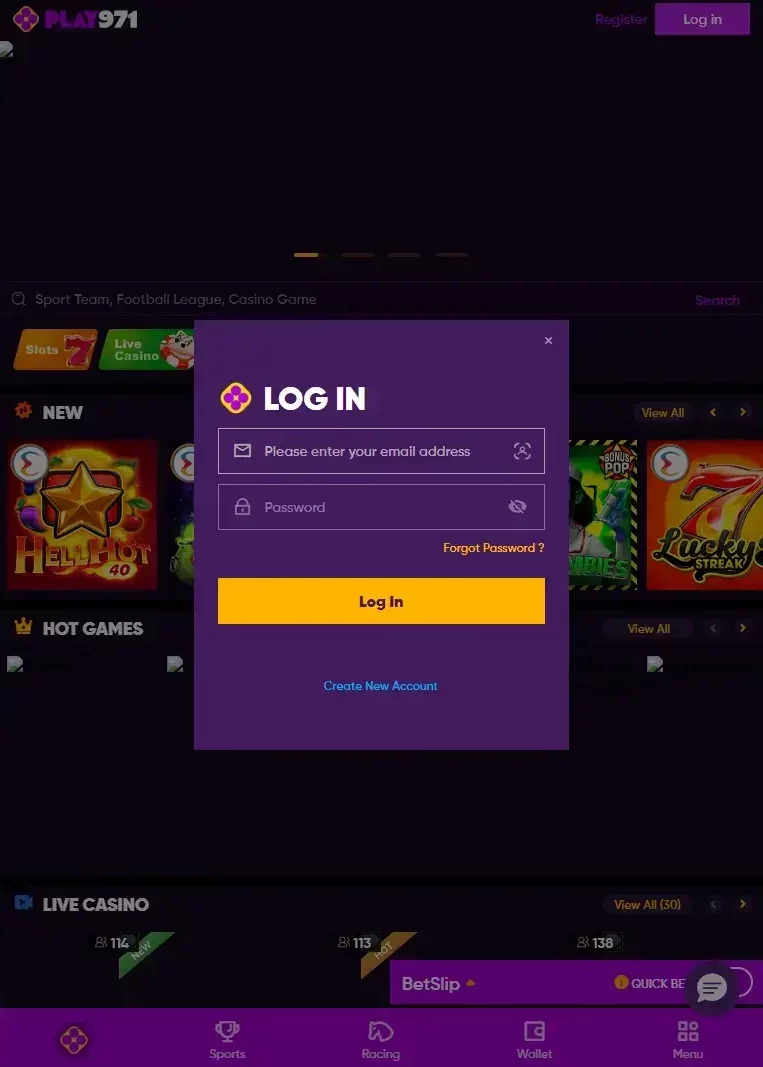
The current interface provides separate Log in and register routes. Existing users should choose Log in and use the credentials connected to the account already created. Because the registration page explicitly identifies the email address as the login credential, there is no reason to invent an additional username when trying to regain access.
A careful sign-in routine looks like this:
- Open Play971 through a recognized access point.
- Choose Log in, not the new-account registration option.
- Enter the email address used when the profile was created.
- Provide the corresponding password through the current login interface.
- Allow any required location check to complete.
- Confirm that the correct account has been opened before using sportsbook, casino, or financial functions.
If the first attempt fails, avoid rapid password guessing. Check the email for spelling errors, look for an outdated password saved by the browser, and confirm that the keyboard layout has not changed. Small details cause a surprising number of login problems.
The terms recognize both web and mobile application access as part of the same service. Moving from desktop to phone therefore does not, by itself, require a second account.
Once access is successful, review the account before proceeding. If you are using a shared device, make sure to close the session when you are done.
Password Recovery
Password recovery is one area where precision matters. The current public Play971 material does not publish a universal customer-facing reset sequence detailed enough to claim that every account follows the same email link, SMS code, or identity-check process.
For that reason, a responsible guide should not invent one.
Start by checking that the registered email is correct. Then use the recovery option presented in the current Play971 account interface. If the available reset process does not resolve access, the platform’s public pages identify Live Chat and a support email as recognized support channels.
Keep the recovery process private. In particular:
- Do not provide your full password to someone who contacts you unexpectedly.
- do not share one-time security codes with an unsolicited caller or message sender;
- do not install remote-control software simply because someone claims to be account support;
- Do not use password-reset links from unverified messages.
Play971’s current Terms contain dedicated sections dealing with viruses, phishing, and scammers, so caution around account-recovery messages is consistent with the platform’s own security framework.
Once access is restored, use a password that is unique to this account. Reusing the password from your email or banking account creates an unnecessary chain of risk.
Registration and Verification
New users currently move through four clearly labelled registration stages: E-Mail Account, Personal Info, Address and Password. The page also requires confirmation that the user is at least 21 years old and accepts the Terms and Privacy Notice.
| Account stage | Current purpose | What the user should do |
| E-Mail Account | Establishes the login credential | Use an email address you control |
| Personal Info | Collects account-holder details | Enter accurate personal information |
| Address | Records address information | Keep details consistent |
| Password | Protects account access | Create a unique password |
| Geolocation | Checks permitted location | Allow location when legitimately eligible |
| Validation | Covered by current Terms | Follow the account-specific request |
Verification is separate from simply completing the form. Play971’s terms include a dedicated Validation Requirements section, confirming that the operator may carry out account or compliance checks.
What is not publicly specified is equally important. The reviewed material does not provide one guaranteed list of KYC documents or one fixed processing time that applies to every customer. There is therefore no basis for promising that every account will require exactly the same identity document, address document, or approval period.
The current Privacy Notice explains that Coin Technology Projects LLC processes personal data associated with the service and contains sections covering information collection, use, retention, sharing, safeguarding, and individual rights. Its current version was updated on 28 July 2026.
Enter registration information carefully the first time. Accurate details make later validation and account support considerably simpler.
Geolocation and Access Restrictions

Location checking is a confirmed part of Play971 access. Current registration, account, and sportsbook pages display a notice requiring users to have geolocation switched on so the system can determine whether they are playing from a permitted location.
That means valid credentials do not automatically guarantee full access. A user can know the correct email and password yet still encounter a restriction if the device cannot confirm an eligible location.
Do not treat a geographic restriction as an invitation to find a workaround. VPNs, false GPS information, modified applications, or another person’s account should not be used to defeat location controls.
If geolocation fails, check the basics first:
- Make sure device location services are enabled;
- Confirm that the browser or recognised application has permission to use them;
- Review whether precise location is required by the device
- Update the browser or operating system if permissions are behaving incorrectly;
- Confirm that you are physically in a location where access is permitted.
The GCGRA states that only businesses and individuals holding valid licenses may conduct commercial gaming activities within the UAE. Play971 adds its own permitted-location controls to that regulated framework.
If you are genuinely in an eligible area but the location continues to fail, review the device settings and use recognized support instead of trying to manipulate the location result.
Account Security
The most effective phishing protection begins before a password is typed. A fraudulent page can copy branding, colours, and login boxes, so users should verify that the browser address matches Play971’s genuine official domain before entering their account credentials.
Do not rely on appearance alone.
The terms have separate sections covering viruses, phishing, scammers, and third-party links. The Privacy Notice also describes safeguards applied to personal data, making confidentiality part of the wider account framework rather than merely a login-page feature.
A sensible security routine includes using a unique password, protecting the email account linked to Play971, and keeping the phone or computer itself locked. Avoid saving credentials on shared devices. When a session ends, log out rather than assuming closing one browser tab is enough.
Be cautious with messages designed to create urgency. A claim that an account will be closed “immediately” unless you click a link, reveal a security code, or install software is a reason to verify the message independently.
If suspicious activity appears, access the account through a trusted route, review what you can, change compromised credentials where appropriate, and contact recognized support.
Security is rarely about one dramatic measure… it is the accumulation of small, consistent habits.
Login FAQ
The current registration page states that the email address provided during account creation is used as the login credential.
Play971’s terms recognize both web and mobile application access as parts of the service. A second profile should not be created simply because the user changes devices.
Use the recovery option presented by the current account interface. If it does not resolve the issue, use recognized Play971 support. The public documentation does not provide enough detail to guarantee one identical reset procedure for every account.
Users must be at least 21 years old to register and use the platform.
The current Terms contain a dedicated Validation Requirements section. However, no single universal document list or guaranteed KYC completion time is publicly specified.
Geolocation is used to check whether the user is playing from a permitted location. Current Play971 pages explicitly require you to enable location services for this purpose.
Coin Technology Projects LLC operates the platform and is currently listed by the GCGRA as both an Internet Gaming Licensee and Sports Wagering Licensee.
Verify that you have reached the genuine Play971 environment; inspect the browser address rather than relying on branding alone and avoid login links received through suspicious messages.
No. Account credentials and location eligibility are separate matters. Restricted jurisdictions remain excluded, and geolocation is used to determine whether access is permitted from the user’s current location.
Account access is easiest when four things remain consistent: accurate registration data, secure credentials, legitimate location, and careful device use. Once logged in, the same responsible approach should continue for casino or sportsbook activity. Set a fixed entertainment budget, avoid chasing losses, and use player controls when additional limits are appropriate. A regulated account can provide safeguards and clearer procedures; it cannot remove the financial risk inherent in gambling.